
In short: choose the hands that deserve deeper study and review each decision with the table, math and range at the same action.
Plan: Max ✅ (Hand analysis is Pro; the Replayer is Free)
Replay to review, Full analysis to understand
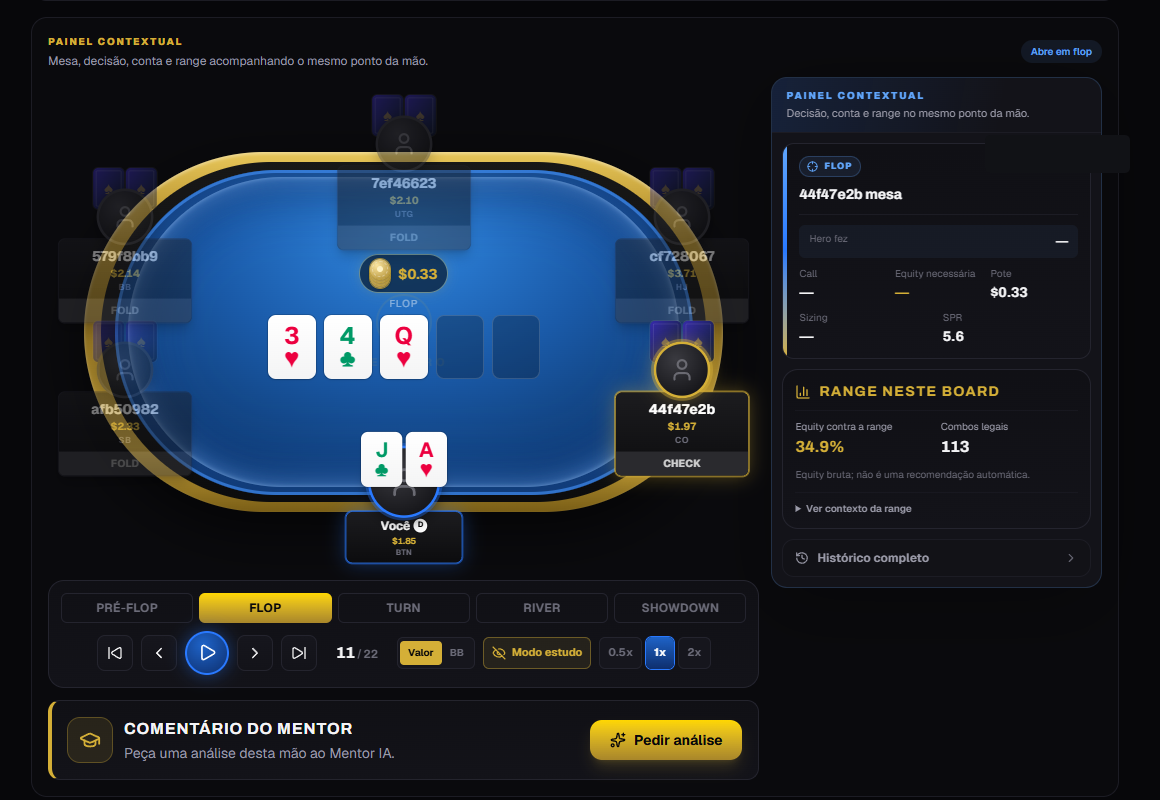
The Replayer remains the quick way to watch a hand. Full analysis is the study workspace: it opens a selected hand, stops at the relevant point and organizes supporting data next to the table.
How to add hands to the queue
You control what enters. No hand is added automatically.
- Open Analysis and find the spot with filters, or open any replay.
- Use Study (the hand joins your queue; the button turns into Queued).
- Go to Hands → Full analysis.
Each hand has one of these states:
- To analyze: what is still in your study sequence;
- Completed: the history of hands you have finished;
- Reopen analysis: returns a completed hand to the queue.
You can also remove a hand without deleting the original imported history.
Queue navigation
When you open a hand, the header shows your position, such as 3 of 12 hands.
- Previous / Next move only through hands with the same queue status;
- Choose hand opens a selector with site, street, date, cards and result;
- Complete hand advances to the next pending hand or returns to the queue.
What the Context panel shows
The panel follows the decision selected on the table:
- the action faced and any Hero action already applied;
- call, pot, sizing, SPR and required equity when available;
- Range on this board, with equity versus range and legal combos;
- collapsible range context and full history;
- Engine commentary for recognized lines.
Equity versus range is calculated automatically on flop, turn and river when the hand is eligible. It uses the preflop line and the Range Vault. It is a raw measurement, not an automatic instruction to bet or call.
Table controls
- Switch between Value and BB to convert the pot, stacks and bets.
- Use streets or action controls to return to the point you want to study.
- Study mode keeps the villain's cards hidden until the proper moment.
- Full history stays collapsed until you need the entire line.
Mentor commentary — Max
On Max, Request analysis generates a longer AI comment for that hand. When a saved analysis already exists, the same card lets you reopen it. The comment is also stored in the Notebook.
Current range-equity limits
The calculation covers heads-up pots with preflop lines recognized by the Range Vault. Multiway, limped and uncovered lines are flagged instead of receiving a made-up estimate.
Common questions
- Can Free or Pro open Full analysis? No. Full analysis (queue, workspace, math and range) is a Max feature. Replay remains available to everyone, and Pro sees each hand's mistakes in Hand analysis.
- Why did a hand open preflop even though a board exists? Some rooms store the full board after Hero had already folded. In that case, the app opens at Hero's last real decision.
- Does completing a hand delete it? No. It only moves to completed history.
- Does removing it from the queue delete the import? No. The hand stays in your history.